Did you know disengaged employees cost businesses over $1.9 trillion each year?
Employee engagement and efficiency suffer as people struggle with simple HR and IT processes. This reality has made employee self-service an essential part of modern workplaces.
The global self-service technology market reached $34.03 billion in 2022 and experts project it to grow at a compound annual growth rate of 13.8% over the next few years. On top of that, it turns out 29% of HR professionals manually enter 30% or less of employee data, which shows that successful employee self-service (ESS) implementation can reduce HR workload by a lot.
Setting up an employee self-service portal alone won't solve everything. Many organizations found that there was more to it - "the introduction of a portal is not a 'one-and-done' project". Your employee self-service system needs thoughtful planning and execution to work well.
Our step-by-step guide will show you how to build an employee self-service portal that delivers on its promise of "better, faster, cheaper" service and support capabilities. You'll learn everything from defining your portal's purpose to ensuring continuous improvement - all the elements needed to create an ESS solution your team will actually use.
Step 1: Define the Purpose of Your Employee Self-Service Portal
The first vital step to build an effective employee self-service portal is defining its purpose. Companies with high ESS adoption rates see a 30% boost in efficiency. You need to get this foundation right for your portal to succeed.
Identify key use cases and user needs
Let's figure out what employees really need from a self-service portal before jumping into tech choices or design. Employee self-service software gives employees a digital platform to handle admin tasks without waiting for help. The best way to find the most useful functions is to run surveys or talk to potential users.
Research shows these ESS portal features are the most valuable:
- HR-related functions: Updating personal details, managing direct deposit info, handling benefits enrollment, accessing tax forms, pay stubs, and historical employment data
- Time and attendance management: Applying for leave, correcting attendance errors, checking approval status, and tracking balances
- Financial transparency: Reviewing salary structures, tracking incentives, checking overtime bonuses, and viewing deductions
- IT support: Submitting and tracking support tickets, status updates, and handling password resets
- Knowledge access: Finding company policies, forms, and accessing company knowledge bases
The portal's setup depends on whether you need it for internal or client-facing support (or both). Accessible design will make sure employees actually use the portal instead of finding workarounds.
Set clear goals for HR, IT, and employees
After identifying key use cases, you should set specific goals for each group. This helps line up your employee self-service portal with your company's bigger picture.
For HR teams, ask yourself: Do you want less HR workload? Better compliance? More accurate payroll processing? ESS portals can cut manual work by 30%. This lets HR focus on strategy, workforce planning, and building company culture.
For IT departments, you might want to automate common tasks like password resets, add AI chatbots for immediate support, and route tickets efficiently. A good ESS setup means fewer basic support questions, letting IT teams tackle bigger problems and change requests.
For employees, the goals should boost their experience and output. ESS portals help staff manage their details independently. This creates transparency and gives them more ownership and accountability. About 88% of employees like online portals better than HR emails, and these portals help reduce HR costs by 23%.
Think about the bigger picture too. Does your company need automation? Want fewer support calls? Maybe you're looking to make employees happier through transparency or stay compliant with GDPR or HIPAA.
Your goals should be SMART (Specific, Measurable, Achievable, Relevant, Time-bound). Setting realistic goals stops employees from getting discouraged when they can't reach them due to limited resources.
Taking time to define your portal's purpose by identifying use cases and setting clear goals creates strong foundations for future development decisions. This early investment in clarity will pay off throughout implementation.
Step 2: Choose the Right ESS Software
My portal's purpose is clear, and now choosing the right software is the crucial next step. A poor choice might lead to low adoption rates, wasted spending, and HR teams stuck with administrative work. This means I should carefully review my options.
Review integration with existing HRIS or ITSM systems
The way potential ESS solutions fit with my organization's current technology ecosystem matters most. Good integration capabilities will give a consistent flow of data across systems. This eliminates duplicate data entry and creates better experiences for employees and administrators alike.
My integration capability review should include:
- Pre-built connectors to my HRIS, ITSM, communication tools, and other critical systems
- Solutions offering up-to-the-minute data analysis
- Platforms with detailed API documentation and developer support
Industry research suggests staying away from vendors who remain unclear about their integration capabilities or solutions that need extensive custom development for simple connections. It's worth mentioning that I should ask for API documentation before choosing any platform. Limited API capabilities can delay implementation by a lot and make costs higher.
Integration helps requests move between tools without employees logging into each system separately. This creates a natural experience where updates in one system show up automatically across all connected platforms.
Look for user-friendly and mobile-ready platforms
Employee adoption determines a self-service portal's success, so the user interface and mobile capabilities play a vital role. A system that's hard to direct will push employees to stick with direct support channels.
My ESS software should have these features:
- Work naturally on mobile devices
- Load quickly, even during peak usage periods
- Offer an easy-to-use navigation without extensive training
- Feature individual-specific experiences based on user roles and priorities
Mobile accessibility stands essential in today's workplace. Leading ESS platforms now offer dedicated mobile apps. These let employees check in and out from remote locations, track GPS-based attendance, and access essential HR features on the go. The best platforms strike a balance between functionality and simplicity. This equips employees to find what they need without a frustrating learning curve.
Beyond core features, solutions offering advanced capabilities like biometric authentication (fingerprint and facial recognition) ensure only authorized personnel can access sensitive employee data. Security concerns remain a top priority, and these features provide peace of mind while keeping the system user-friendly.
Make sure it's flexible and supports multiple languages
My ESS portal requirements will change as my organization grows. The platform should adapt and grow with my business.
While reviewing flexibility, I should check:
- If the platform handles increased user loads without performance issues
- Customization options for workflows, fields, and user interfaces
- Adding new features and use cases without major reinvestment
A 50% growth projection within two years needs a platform that can handle that scale without getting pricey migrations. I should avoid platforms needing extensive customization for simple functionality since these often become maintenance nightmares.
Organizations with diverse workforces need multilingual support. The best ESS solutions come with multi-language interfaces. This lets employees across different locations use the portal in their preferred language. Such features help all employees use the system well, whatever their location.
A careful review of integration capabilities, user experience, and flexibility helps select an ESS platform that delivers on its promise. It improves efficiency while reducing administrative work. High adoption rates show the true success of ESS implementation.
Step 3: Design a User-Centric Interface
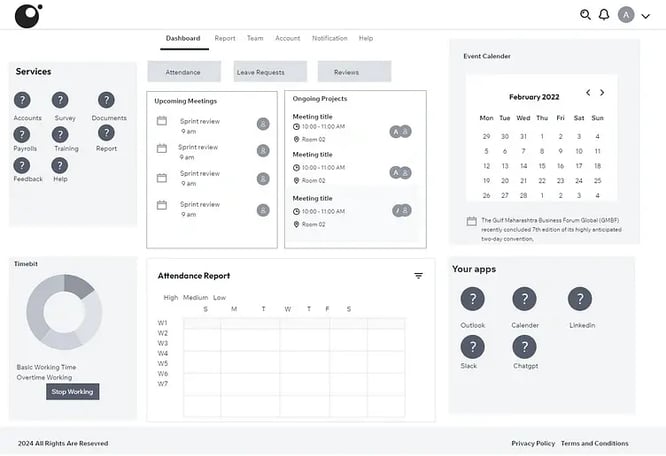
Image Source: Dribbble
Your employee self-service portal's interface connects employees with HR systems. Users will abandon even the most feature-rich software if they find it confusing or hard to use. Research shows that an accessible design builds trust and gets people to use it more while reducing friction between employees and digital systems.
Simplify navigation and layout
The employee self-service portal needs clear, consistent navigation that points employees in the right direction. A simplified layout boosts adoption rates and takes the load off HR teams, unlike complex interfaces that leave users confused.
Here's how to keep things simple:
- Set up easy-to-use menu structures with logical information flow
- Use the same style for buttons, forms, and interactions across the portal
- Pick colors, fonts, and spacing that help users spot actions quickly
- Put common tasks within easy reach - just a few clicks away
The design should put user needs first. Talk to employees about what they use most often. Giving these features prime spots shows employees the portal exists to help them, not just handle paperwork.
Use plain language and avoid technical jargon
Technical terms create barriers between employees and information. The portal content needs a thorough review to remove any confusing language, especially for users who aren't familiar with HR processes or technical terms.
Plain language does more than simplify - it speaks in your organization's voice and helps users feel confident. Simple terms that everyone understands make the portal work for all employees, whatever their tech skills or department.
Try these approaches:
- Write like you're having a conversation
- Break down complex ideas into simple steps
- Use words that match how employees talk about HR
- Check with real users to make sure everything makes sense
The goal is to let employees focus on getting things done instead of trying to figure out what things mean.
Include accessibility features for all users
Your employee self-service system should work for everyone, including people with disabilities. Workforce planning experts have found that systems built for accessibility see higher usage across all groups. Making things accessible isn't just good practice - it often meets legal requirements like WCAG guidelines.
A fully accessible system needs:
- Screen reader support through proper HTML and image descriptions
- Full keyboard control without needing a mouse
- Colors that work for people with vision differences
- Support for multiple languages
Users should be able to make text bigger - up to 200% - without breaking anything. Adding text versions of videos and audio helps meet different user needs.
A good employee portal design includes clear paths to get human help. This mix of automated and human support helps all employees complete their tasks and feel confident using the system.
Making the portal simple to use, easy to understand, and accessible to everyone leads to better adoption rates. You'll see greater returns on your ESS investment when employees actually want to use it.
Step 4: Integrate Automation and AI Features
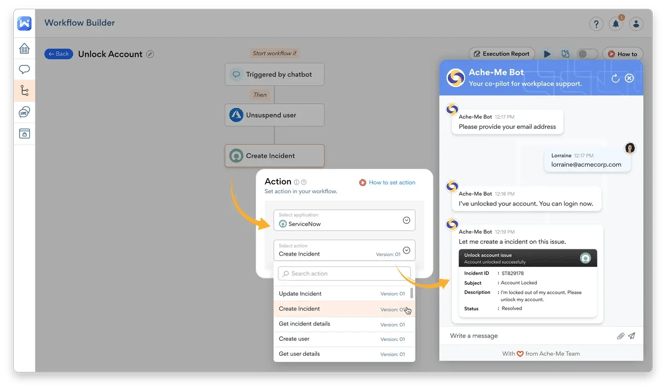
Image Source: Workativ
Employee self-service systems become powerful when they smoothly combine automation and AI features. Automation removes boring tasks that eat up HR and IT resources while making life easier for employees. Studies show organizations can reduce administrative task time by 22% after introducing Employee Self-Service (ESS).
Let employees handle password resets themselves
Password problems create lots of IT support tickets. A self-service password reset system lets employees get back into their accounts without calling IT support. Remote workers find this extra helpful since they can safely reset passwords without being in the office.
A good password reset system should check user identity in multiple ways. Modern systems give users several verification choices like email, phone numbers, security questions, and even facial recognition. This multi-factor approach will give a secure yet accessible solution.
Password reset automation helps the whole organization:
- IT support costs drop as staff reset passwords without helpdesk help
- Better security through proper identity checks
- Staff get back to work faster without delays
- Less waiting time that would be spent on IT assistance
Use AI chatbots to get help right away
AI-powered chatbots mark a big step forward for employee self-service portals. These smart virtual assistants pull information from HR databases in seconds. HR managers and employees save lots of time.
Today's AI chatbots in employee portals handle many tasks:
- Answer common questions
- Explain policies
- Process leave requests
- Share payroll details
- Give compliance updates
- Handle routine admin work
These chatbots do more than HR tasks. They fix common IT problems like VPN issues and help install software. Every question creates an IT ticket automatically, and human agents step in only for complex problems.
AI chatbots work 24/7, which fits perfectly with modern work life where people need help at any time. This always-on support enables employees and cuts down incoming requests.
Route and approve tickets automatically
Automated ticket routing frees up technicians from basic tasks. The system keeps the unassigned ticket queue small and sends issues to the right experts. Rules or AI check important ticket details—like keywords, customer type, problem category, and priority—before picking the right agent or department.
Good automated routing systems can:
- Send tickets to agents with the right skills
- Share work evenly across teams
- Put urgent requests first based on SLA needs
- Match tickets to agents using skill tags
Employee self-service systems can use different routing methods based on what organizations need. Round-robin gives out tickets in turns without checking workload or skills. Load balancing looks at how busy technicians are before assigning work. AI routing uses past data to make smart choices.
Setting up automation takes time at first, but employee self-service portals gain big benefits later. Tickets get assigned faster and more accurately. The system handles large volumes better, which saves money over time.
Step 5: Ensure Security, Compliance, and Data Privacy
Security concerns create the biggest barrier to employee self-service portal adoption. Trust remains fundamental—employees need assurance about their personal information's security, including pay history and medical benefits. Employee resistance grows without active security measures in place.
Implement role-based access and encryption
Role-Based Permissions (RBP) acts as the life-blood of employee self-service security. This system restricts access to applications and data based on specific job functions. My employee self-service system needs:
- Permission roles that define employee tasks
- Clear definitions of granted population groups (permission recipients)
- Target population groups (data access scope)
Access control minimizes security risks through the principle of least privilege—users receive access only to essential resources. Data encryption protects information at rest and in transit. The system uses multi-factor authentication as an extra security layer that gives employees confidence about their sensitive data's protection.
Comply with GDPR, HIPAA, and other regulations
Different regulatory frameworks govern data handling in employee self-service portals based on industry and location. The General Data Protection Regulation (GDPR) gives specific rights to individuals about their personal data—they can access, correct, and delete their information. HIPAA protects health information (PHI) in healthcare environments.
These regulations require strict access controls. Only authorized personnel can view sensitive information when needed. Data protection requires encryption both at rest and during transmission. My portal must comply with these regulations—GDPR violations alone could lead to fines up to €20 million or 4% of annual global turnover.
Set up audit trails and data retention policies
A complete security approach requires detailed records of data access—who views what information and when. Audit trails in the portal help monitor suspicious activities and prove regulatory compliance.
Smart retention policies automatically remove outdated or unnecessary employee data. This strategy reduces data hoarding risks and prevents accidental information leaks.
Security measures need visibility equal to their implementation. A clear privacy policy explains data collection, storage, and handling methods to build employee trust. Regular reviews and updates of access permissions show a steadfast dedication to data protection.
The employee self-service portal builds trust through security, compliance, and privacy priorities from day one. These elements create the foundation needed for widespread adoption and successful implementation.
Step 6: Launch, Train, and Continuously Improve
A successful employee self-service portal needs more than just technical implementation. Research shows that companies with strong training programs achieve 75% higher adoption rates for their self-service solutions.
Provide onboarding and training for employees
The new system announcement should reach all employees with clear details about timeline, benefits, and support resources. Your training program should match different learning preferences through:
- In-person workshops and hands-on sessions
- Video tutorials for visual learners
- Written guides and FAQ sections
- "ESS Champions" in each department to boost adoption
Tools like SAP WalkMe will give users step-by-step guidance through self-service features, making the experience smoother.
Collect feedback and monitor usage
Your employee self-service system should grow with your organization's needs through continuous feedback. The Plan-Do-Check-Act framework helps create a structured feedback system. You can learn about user experiences through:
- Structured surveys about ease of use and value
- Focus groups to understand user experiences
- Direct communication channels for suggestions
Use analytics to optimize workflows and content
The right performance indicators will show how well your employee self-service portal works. Key metrics include workflow completion times, search success rates, knowledge quality ratings, and resolution rates. These numbers help spot areas where users face difficulties or give up on requests.
Analytics help HR teams move from support to strategy by showing clear workflow performance. This analytical approach changes challenges into growth opportunities.
Conclusion
Creating an effective employee self-service portal needs careful planning and execution, but the rewards make the effort worthwhile. This guide outlines six essential steps to build a portal that employees will want to use rather than avoid.
A successful ESS portal starts with clear purpose and goals that match both your organization's needs and employee expectations. The software you choose greatly affects adoption rates. A user-friendly interface helps employees use the system easily without frustration.
AI features and automation turn ordinary portals into powerful productivity tools that cut administrative work across departments. Employees can solve problems on their own through password resets, chatbot support, and smart ticket routing. This frees HR and IT teams to focus on strategic initiatives.
Your portal needs robust security and compliance measures. Role-based access, encryption, and clear data practices are the foundations of trust needed for widespread adoption. Employees will only use a system they trust with their personal information.
The portal's launch marks just the beginning. Your ESS solution grows with your organization's changing needs through continuous improvement, training, feedback, and data-driven optimization.
High-performing employee self-service portals bring clear benefits - lower administrative costs, better productivity, and higher employee satisfaction. The implementation might seem complex at first, but a structured approach will create an ESS solution that delivers real value.
You can start small, track your results, and add features based on actual usage. The self-service revolution begins by enabling employees to help themselves. Your organization will certainly benefit from this strategic investment.
Key Takeaways
Building a successful employee self-service portal requires strategic planning, user-focused design, and continuous optimization to achieve the promised benefits of reduced costs and improved efficiency.
• Start with clear purpose and goals - Define specific use cases for HR, IT, and employees before selecting technology to ensure 30% efficiency gains and higher adoption rates.
• Prioritize integration and user experience - Choose software that seamlessly connects with existing HRIS/ITSM systems and offers mobile-ready, intuitive interfaces to prevent user abandonment.
• Implement smart automation features - Enable self-service password resets, AI chatbots for 24/7 support, and automated ticket routing to reduce administrative workload by 22%.
• Build security and compliance from day one - Use role-based access, encryption, and audit trails to meet GDPR/HIPAA requirements and build employee trust in the system.
• Focus on continuous improvement - Provide comprehensive training, collect user feedback, and use analytics to optimize workflows for sustained success and 75% higher adoption rates.
The key to ESS portal success lies in balancing powerful functionality with simplicity, ensuring employees can independently handle routine tasks while maintaining security and compliance standards. Organizations that follow this structured approach typically see significant reductions in support tickets and administrative costs within the first year of implementation.
FAQs
Q1. What are the key steps to build an effective employee self-service portal? The key steps include defining the portal's purpose, choosing the right software, designing a user-centric interface, integrating automation and AI features, ensuring security and compliance, and focusing on continuous improvement through training and feedback collection.
Q2. How can automation improve an employee self-service portal? Automation can significantly enhance an ESS portal by enabling self-service for common tasks like password resets, using AI chatbots for real-time support, and automating ticket routing and approvals. This reduces administrative workload and improves employee productivity.
Q3. What security measures are essential for an employee self-service portal? Essential security measures include implementing role-based access controls, using encryption for data at rest and in transit, ensuring compliance with regulations like GDPR and HIPAA, and setting up audit trails and data retention policies.
Q4. How can organizations encourage adoption of their employee self-service portal? To encourage adoption, organizations should provide comprehensive onboarding and training, offer multiple learning formats, collect and act on user feedback, and use analytics to continuously optimize the portal's workflows and content.
Q5. What are the benefits of a well-implemented employee self-service portal? A well-implemented ESS portal can reduce administrative costs, increase employee productivity, enhance satisfaction, and free up HR and IT teams to focus on more strategic initiatives. It can also improve data accuracy and ensure better compliance with regulations.
Trusted by 330+ CHROs
See why global HR teams rely on Amber to listen, act, and retain their best people.
