Companies can save substantial time and money through HR process automation by eliminating up to 56% of traditional HR tasks. HR leaders currently spend 3-4 hours each day on administrative tasks that automation could handle. This creates a clear chance to improve operations.
Modern HR planning goes beyond simple administration and focuses on strategic workforce development. The employee lifecycle includes recruitment, onboarding, performance management, leave requests, and benefits registration - from hiring to departure. HR process automation revolutionizes these repetitive tasks into self-optimizing systems. GenAI solutions alone could save HR Business Partners 25% to 30% of their time.
Organizations that embrace HR technology tools gain competitive advantages through streamlined processes, lower costs, and better results. Simplified processes have led to a 54% increase in both employee and customer satisfaction. The workflow management system market shows remarkable growth at 33.3% annually, with projections reaching $86.63 billion by 2030. This indicates a fundamental transformation in HR operations.
We will explore how self-optimizing HR workflows quietly revolutionize human resources departments in various industries.
Understanding HR Process Automation in 2025
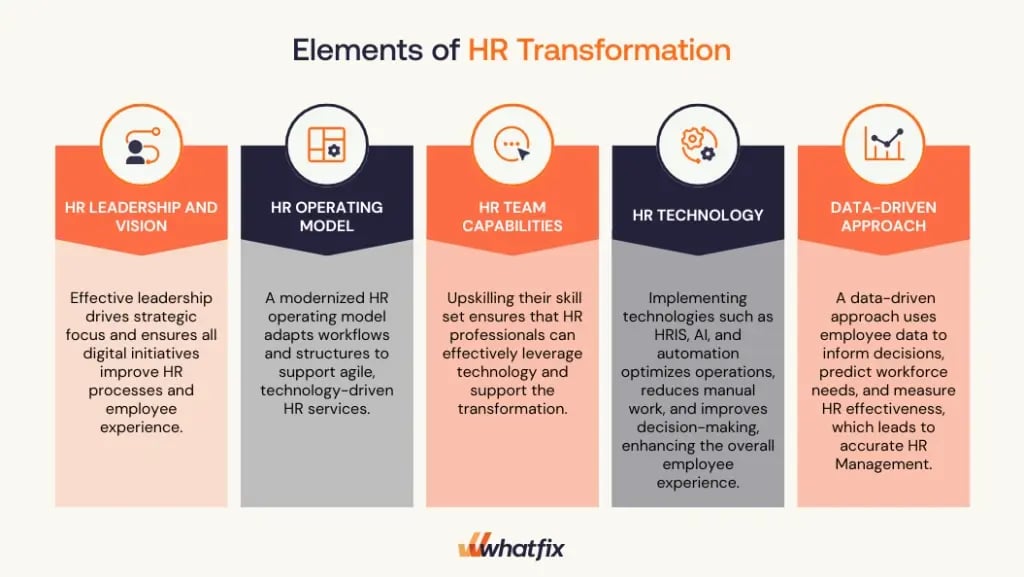
Image Source: Whatfix
HR process automation has become the life-blood of modern human resources management. HR leaders must understand the technical foundations of this transformation as organizations adapt to changing workforce dynamics in 2025.
Definition of HR process automation
HR process automation uses technology systems to handle routine and repetitive HR tasks without human intervention. Software, algorithms, and digital tools now manage core HR responsibilities that once needed manual processing. HR automation takes over everyday activities like onboarding, time tracking, payroll processing, and benefits administration.
The main goal goes beyond just efficiency. HR teams can now focus on strategic initiatives that add real value to their organizations. Companies that digitize time-consuming processes run more smoothly, have better security, and make fewer mistakes. HR automation has evolved from a luxury to a business necessity, especially with the massive amount of paperwork in daily HR processes.
Difference between workflows and automation
Workflows and automation are two distinct concepts in the HR technology ecosystem. HR workflows are tasks and processes where HR teams and employees work together. These include document retrieval, leave approvals, reimbursements, and performance evaluations. HR teams follow these recurring pathways in their daily work.
The technical systems that run these workflows without manual work make up the automation part. HR workflow automation turns repetitive, manual HR tasks into smooth digital processes. Teams no longer depend on checklists, email threads, and messy spreadsheets. Instead, they use organized, self-running systems. This technology uses platforms that react to specific business events and take action in real-time.
To cite an instance, when employees submit time-off requests, an automated workflow can:
- Route the request to the appropriate manager
- Send automatic reminders if approval is delayed
- Update calendar systems once approved
- Adjust payroll calculations accordingly
Role of HRIS and HCM platforms
Specialized platforms that have grown more sophisticated over time form the technical foundation of HR process automation. Human resources information system (HRIS), human resources management system (HRMS), and human capital management (HCM) represent increasingly advanced technologies, though people sometimes use these terms interchangeably.
HRIS forms the basic layer. It manages connected data in HR processes of all sizes, including benefits, workforce management, payroll, and core HR functions. Modern HRIS solutions support many HR processes through smart workflow automation. Organizations can manage employee absences better, work more efficiently, and track global employee time easily.
HRMS built upon HRIS features to offer detailed software suites for managing internal HR functions. Companies used HRMS in the early 2000s when on-premises systems ruled. These systems handled everything from employee data management to payroll, recruitment, benefits, and talent management.
HCM offers the most advanced capabilities and describes complete cloud-based HR application suites. Digital assistants, AI, and collaborative tools help teams share information. HCM platforms also include advanced talent management functions like performance management, learning systems, succession planning, and compensation planning. Traditional administrative HR functions now create strategic opportunities to boost engagement, productivity, and business value.
Companies start building their HR technology strategy by setting up core HRIS functionality as their central hub for employee data. They can then expand their capabilities to handle more complex workforce management needs.
Key Use Cases of Self-Optimizing HR Workflows

Image Source: AIHR
Self-optimizing HR workflows make the biggest difference in four key operational areas where teams waste too much time on repetitive tasks. Let's get into how these workflows streamline processes throughout the employee lifecycle.
Automated onboarding and document collection
The onboarding phase shapes an employee's performance, satisfaction, involvement, and long-term retention. A well-designed automated onboarding process works in phases. It helps collect information at the right time, connects employees with key stakeholders, and reminds team members to participate in the process.
The automation turns paper-heavy processes into a simple digital experience. New hires trigger document collection workflows, system access setup, and training schedules automatically. Research shows automated onboarding has cut the time HR teams spend on common tasks by 75%.
The intelligent automation can pre-fill forms using existing information and route permissions to managers automatically. It uses natural language processing to pull information from documents and fill the right fields in HR systems. This eliminates duplicate data entry and gives employees a consistent experience.
Leave request routing and approval
Leave management becomes messy for everyone without automation - HR teams and employees suffer the most. Automated systems create a better experience. Employees can request time off themselves, managers get a simple approval process, and HR keeps track through one central system.
Managers get instant notifications by email or workplace chat when employees request leave. They can approve or deny these requests right from their communication tools. The system calculates remaining leave days, adjusts for holidays, and updates calendars once approved.
The self-optimizing leave workflows route requests to the right approvers based on company rules. Microsoft's HR system, for example, handles different types of leave differently - medical leave goes to HR while vacation requests go to direct managers.
Performance review scheduling and reminders
Performance review cycles create many scheduling challenges that automation fixes. Automated review workflows follow specific timelines. This keeps processes predictable and on track.
The system sends reminders through email, Slack, or Microsoft Teams at just the right time. Review cycles start with automatic kickoff emails to everyone involved, including due dates and form links. Follow-up reminders go out at set times - seven days before deadlines, on due dates, and for final approvals.
Analytics help make reviews more objective. The system tracks completion rates, participation, and progress against goals. Some advanced systems use AI to spot potential bias in reviews or suggest more neutral language.
Exit formalities and asset recovery
The offboarding process plays a crucial role in security and final impressions. Exit workflows automate the settlement process when people resign, retire, or leave the company.
Automated exit management assigns tasks to different departments at once - IT, admin, finance, and managers get notifications until they complete their parts. Experience letters, clearance documents, and final settlements get generated automatically.
IT asset recovery becomes much simpler with automation. The system tracks company devices, software licenses, and security tokens that need to be returned. It logs returned items, checks their condition, and decides whether to reuse, recycle, or retire each asset.
A 2023 SHRM study found companies using automated exit workflows had 40% fewer errors and saved over 20 hours per offboarding. Deloitte reports show automated offboarding cuts administrative time by 60% and improves employee satisfaction during exit by 35%.
Challenges in Automating HR Workflows
HR process automation initiatives face several hurdles despite their promise. Organizations need to understand these obstacles to modernize their workflows with minimal disruption.
Resistance to change from HR teams
HR teams' resistance remains one of the biggest barriers to successful automation. Both employees and management worry that automation will replace jobs or disrupt their work routines. These fears can derail implementation plans from the start.
A change management approach needs to tackle these concerns head-on:
- Clear communication: Explain openly that automation aims to boost efficiency and create time for strategic tasks, not eliminate positions
- Employee involvement: Get team members involved in decisions by collecting feedback about current workflows and potential automation improvements
- Complete training: Offer thorough training programs and continuous support to build confidence in new automation tools
Research shows 95% of businesses want to foster a compliance-centric culture. Without proper change management, even the best HR planning process faces adoption challenges.
Data security and compliance risks
Security and compliance concerns pose major obstacles because of HR data's sensitive nature. HR departments handle confidential information like personal details, payroll records, and performance evaluations. This makes them vulnerable to data breaches without proper security measures.
The financial stakes are high without doubt. A study by IBM revealed that the average cost of a data breach reaches approximately INR 367.05 million. Organizations must focus on:
- Regulatory compliance: Making sure automation solutions follow data protection regulations like GDPR and HIPAA
- Strong security features: Using encryption (both at rest and in transit), role-based access controls, and regular security audits
- Privacy-first approach: Creating complete data privacy policies that govern employee information collection, storage, and processing
Companies risk financial penalties and severe reputation damage without these safeguards. This can affect their recruitment process and overall business operations.
Integration issues with legacy systems
The third challenge arises when connecting new automation tools with existing technologies. HR departments use multiple software systems for recruitment, payroll, onboarding, and performance management. Poor communication between these systems creates data silos and broken processes.
Integration difficulties can cancel out automation's benefits. A Deloitte survey found that 70% of HR leaders see integrating new technologies with existing systems as one of their biggest challenges. Organizations should address these issues through:
- Selecting flexible solutions: Choose automation platforms with strong APIs that help smooth integration with existing HR systems
- Vendor partnerships: Work with providers who offer custom integration services for specific technology ecosystems
- Middleware technology: Use bridge platforms to enable smooth data transfers between legacy systems and modern automation tools
The goal should focus on building an interconnected ecosystem. Information needs to flow freely between systems to prevent fragmentation that undermines automation's efficiency gains.
Designing Custom HR Workflows with No-Code Tools

Image Source: Zapier
Custom workflows are one of the best ways to simplify your HR planning process. No-code platforms now allow HR professionals without technical knowledge to design sophisticated automation solutions that match their needs.
Mapping current HR processes
Your HR process automation trip should start with proper documentation of existing workflows. We recommend creating a list of all your core HR processes, from recruitment to offboarding. This list will help you build an effective map for future automation.
Each HR process needs:
- Documentation of tasks, decision points, and interactions
- Details about who handles each step and their systems
- Information about manual hand-offs, approvals, and communication channels
- Areas where delays or errors often happen
The next step is analyzing each mapped process to find bottlenecks, redundancies, and compliance risks. A detailed inventory helps you spot issues affecting time, cost, and employee morale. Tasks that are repetitive, time-consuming, or error-prone make perfect candidates for automation.
Using visual workflow builders
Visual workflow builders have transformed how HR teams approach automation. Modern no-code platforms feature easy-to-use drag-and-drop interfaces. HR professionals can now create complex workflows without any coding knowledge.
These visual tools let you map each workflow stage with graphics. You can add approvals, conditions, and actions without writing a single line of code. By 2025, approximately 70% of new applications will use no-code or low-code technologies. This shows how important these tools are becoming in HR technology.
Companies that use no-code HR tools see great results. They report 30% cost savings per hire, 50% faster onboarding, and 82% better new hire retention. Team members find it easier to cooperate across departments with visual workflow designers.
These tools do more than just automate tasks. Many offer up-to-the-minute data analysis that tracks workflow progress, spots bottlenecks, and measures performance. You can make quick adjustments when needed to keep workflows running smoothly.
Setting up conditional logic and triggers
Adaptive HR process automation becomes powerful through conditional logic and triggers. Conditional logic adds rules that change workflow paths based on specific conditions or data. This decision-making component creates different routes depending on factors like employee type, request category, or approval limits.
To name just one example, an HR approval workflow might use conditional logic like this:
- IF salary request ≤ approved budget, THEN HR approves directly
- IF salary request > approved budget, THEN CFO approval required
Triggers start a workflow based on user actions (form submissions), system events (upcoming hiring dates), or specific attributes (employee department). You can set rules using fields from previous workflow steps when setting up triggers.
Complex scenarios might need multiple conditions with AND/OR logic—like "Last seen < 14 days AND browser language is English". Your HR recruitment process can handle various situations automatically this way.
The best way to implement these features is to start small. Try simple conditional logic in one or two problem areas before expanding. This approach lets you test and improve your automated workflows before using them across your organization.
Enabling Employees with Contextual Guidance
Contextual guidance has become the life-blood of modern hr process automation. Users receive just-in-time support exactly when they need it. Rather than forcing users to seek help, contextual systems deliver individual-specific assistance based on their current activity, location, and past interactions.
In-app tours and task lists for onboarding
Product tours help users master enterprise software by teaching them key features relevant to their roles. These guided in-app tutorials combine interactive walkthroughs, tooltips, and checklists that help users realize value quickly. Interactive walkthroughs guide users through features step-by-step and compel them to take action rather than passively view demonstrations.
Task lists equip new employees with structured checklists of items, videos to watch, and in-app flows they need to complete during onboarding. This approach prevents overlooking critical steps in the hr planning process. A well-laid-out onboarding process sets the tone for a new hire's experience and gives them all the tools, knowledge, and support needed for a smooth transition.
Smart tips and pop-ups for form validation
Form validation provides up-to-the-minute feedback that minimizes data entry errors before submission. Users understand what they need to input to progress, as the system blocks progression until certain character requirements are met.
Traditional page reload validation is no match for instant validation, with studies showing:
- 22% increase in success rates
- 31% increase in satisfaction rating
- 42% decrease in completion times
Smart Tips deliver timely tooltips that provide additional context or prompt specific actions within hr process automation systems. Validation error messages should describe the exact error and avoid vague messaging.
Self-help widgets for policy and SOP access
Self-service portals empower employees to access information about hr recruitment process, policies, standard operating procedures, and other resources independently. These embedded help centers give end-users in-app resource centers to resolve product-related questions about set-up, feature usage, use cases, FAQs, and account issues.
The knowledge base reduces employee tickets and allows HR teams to focus on complex issues. AI-powered search engines help employees find relevant information by typing keywords or related phrases.
Tracking Workflow Performance and Optimization
Measuring your hr process performance plays a key role in making improvements. Companies need clear metrics and ways to apply them. Without proper measurement, making optimizations becomes impossible.
Using analytics to identify friction points
Analytics changes HR from a support role into a strategic partner by showing clear visibility into workflow health. Business outcomes connect directly with valuable data that focuses on engagement, retention, success factors, and workforce health metrics. Teams can spot patterns through dashboards, heatmaps, and trend lines. This makes it simple to identify rising turnover in high-value departments or repeated employee complaints within specific teams.
Collecting feedback with in-app surveys
Short questionnaires at key moments help track employee satisfaction during their time with the company. These in-app surveys trigger automatically when employees reach different milestones. Teams should mix closed questions for numbers with open-ended questions to get detailed insights. This feedback helps create individual-specific experiences and better decisions throughout the hr recruitment process.
Iterating workflows based on usage data
The hr planning process needs constant monitoring and adjustments - it's not a one-time setup. Here's how to make effective iterations:
- Track time saved, error rates, and employee satisfaction
- Compare improved workflows with previous baseline data
- Document all feedback and insights for future reference
This evidence-based approach turns potential workflow conflicts into opportunities for growth and participation.
Conclusion
No-code automation marks a radical alteration from traditional manual processes to strategic, value-driven HR operations. This piece explores how automation streamlines significant HR functions in the employee lifecycle, from onboarding to offboarding.
Time savings from automated repetitive tasks benefit HR teams directly. Notwithstanding that, the real advantage extends beyond efficiency. Modern HR professionals can now focus their expertise on strategic initiatives instead of paperwork. On top of that, it gives employees faster, more consistent service delivery without delayed approvals or lost documentation.
Organizations should take a strategic approach to automation. HR departments can create customized workflows without technical expertise by mapping existing processes, understanding bottlenecks, and choosing appropriate no-code tools. Challenges will surface - team resistance, data security concerns, and integration complexities need careful planning and implementation.
Contextual guidance reshapes the employee's experience, while analytics gives significant insights to optimize continuously. Strong evidence shows that organizations welcoming HR process automation gain measurable advantages through reduced costs, increased efficiency, and improved satisfaction.
Tomorrow's HR departments will serve as strategic business partners rather than administrative centers. Self-optimizing workflows will become vital components of competitive advantage. Companies adapting now position themselves ahead in this transformation.
The path to fully automated HR processes needs thoughtful planning, stakeholder support, and constant refinement. The rewards make this development worthwhile for forward-thinking organizations - freed-up strategic time, reduced errors, consistent employee experiences, and analytical decision making.
Trusted by 330+ CHROs
See why global HR teams rely on Amber to listen, act, and retain their best people.
