9 min read
Last Updated: 25 December 2025
HR process automation reshapes how departments operate today. Research shows that HR staff spends 57% of their time doing administrative tasks. Does your team lose a full workday each week because of repetitive processes? The reality is stark - HR teams at top companies waste 20% of their time on redundant tasks, which equals a complete eight-hour workday every week.
HR automation adoption has grown by almost 600% in just two years, and with good reason too. Companies that use hr automation tools report cutting down manual tasks by 70%. On top of that, the financial effects are huge. Each recruiter spends about 17.7 hours handling admin work per open position. This costs companies over 8,400 hours and $22,000 in lost productivity yearly per recruiter. In this piece, we'll show you the best ways to automate hr processes. These methods will help your team break free from administrative burdens and focus on strategic work instead of compliance and routine tasks that eat up 40% to 60% of their time.
Why Manual HR Tasks Are Slowing Teams Down
Small HR teams spend between 6 and 8 hours weekly on basic administrative tasks like data entry, approvals, and reporting. This time drain is nowhere near just lost hours—it creates a strategic disadvantage that keeps HR professionals from doing what matters most.
Time spent on repetitive tasks like payroll and onboarding
HR managers who spend a full workday each week on manual administration cost their organizations 10-15% of their annual salaries on tasks that automation could handle. These repetitive processes cost businesses about 19 working days per year per employee.
Mid-sized companies waste over 77,000 hours yearly on this administrative load, which costs millions in salaries. Each manual data entry costs an average of INR 403.34, with some tasks reaching INR 1787.18.
Payroll and onboarding are the biggest time drains:
- Manual onboarding needs printing, organizing, and distributing multiple documents for each new hire. Employees must fill these forms by hand, which often delays processing due to errors
- Payroll processing takes hours each pay period to calculate work hours, track overtime, apply tax deductions, and manage benefits
- Leave management requires constant manual updates and approvals that eat up valuable time
Effect on employee experience and HR morale
Manual processes create problems beyond wasted time. HR teams can't focus on engagement, retention, and growth initiatives because they're stuck with administrative tasks. This lack of strategic focus hurts the whole organization.
Employees get frustrated with slow HR processes, whether it's late paychecks, slow onboarding, or compliance delays. Staff members feel the friction when HR gets bogged down in inefficiency, which makes them disengage and more likely to leave.
Numbers tell the story. Gallup's State of the Global Workplace Report shows global employee engagement has dropped to 21%, while 62% of employees are "not engaged" and 17% are "actively disengaged". Lost productivity from declining engagement costs the global economy USINR 36958.64 billion each year.
Manual systems make everything worse through slow response times to questions, limited access to personal information, and complex leave application processes. Payroll calculation errors often create distrust between employees and HR, which can damage company culture.
Scalability issues in growing organizations
Manual HR processes break down as businesses grow. Systems that work for 10 people become a nightmare with 200 employees. More employees mean more complicated spreadsheets, forms, and approvals, which overwhelm HR teams and slow growth.
HR processes vary between departments or managers without standardized documentation. This creates compliance risks, confuses employees, and prevents HR from scaling as the organization grows.
Growing companies face multiplying onboarding challenges. Poor onboarding experiences hurt the employer's brand and slow down new hire productivity. Bad offboarding misses chances for knowledge transfer and creates compliance risks.
Teams need more performance management through regular reviews, promotions, and contract negotiations as they grow. Manual processes create bottlenecks in recruitment, onboarding, and performance management.
Manual HR processes block growth by creating inefficiencies that affect both HR teams and the organization's ability to scale while keeping employees happy.
8 HR Processes You Can Automate to Save Time
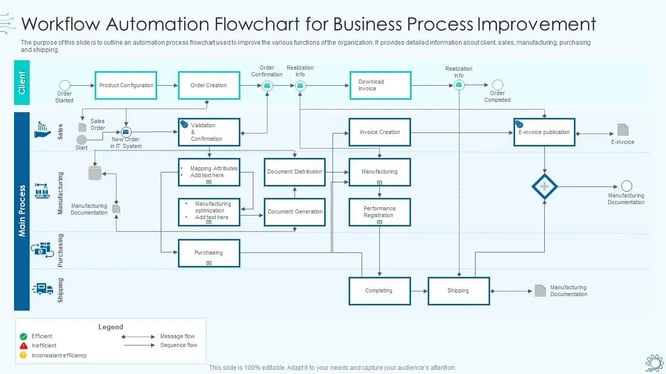
Image Source: SlideTeam
HR automation tools give you back precious hours in your workday. Research shows these tools can cut manual tasks by up to 70%. Your team can now focus on strategic initiatives instead of administrative tasks.
1. Recruitment and resume screening
AI-powered resume screening saves countless hours spent on application reviews. These systems extract key data from resumes in seconds, while humans need minutes to do the same task. The screening software matches applicants to job criteria with 90% accuracy. This reduces the chances of overlooking qualified candidates. The system promotes diversity through objective assessment of skills and experience without human bias.
2. Employee onboarding workflows
Automated onboarding systems make welcoming new hires smooth and efficient. The system creates HRIS profiles, sets up accounts, sends welcome emails, and prepares paperwork once an employee is hired. This digital approach helps employees adapt to their roles quickly and improves retention rates.
3. Payroll and benefits administration
Automated payroll handles calculations, taxes, and reports with perfect accuracy. Companies using these systems report much less administrative work. Modern systems let employees check pay stubs and update their details on their own. About 83% of employers now give instant access to pay information, setting a new standard for transparency.
4. Performance review scheduling and tracking
Performance review software takes away the hassle of coordinating evaluations. The system schedules reviews, gathers feedback, and creates useful reports. These tools merge performance reviews with goal setting to enable better employee development.
5. Time-off requests and attendance tracking
Leave management systems handle everything from application to approval. Managers get complete visibility of leave data, balances, and holiday schedules. Location-based attendance systems verify employee presence accurately and reduce false entries.
6. Employee data updates and self-service portals
Self-service portals enable employees to handle their information, get documents, and submit requests directly. Administrative queries drop by 70% while data accuracy improves as employees update their own records. The transparency builds workplace trust and creates a better employee experience.
7. Compliance documentation and audit trails
Automated compliance systems build regulatory requirements into HR processes. They track, enforce, and document compliance with labor laws and company policies. This creates a well-laid-out framework that reduces reliance on personal judgment. The system generates detailed logs of approvals and transactions that are a great way to get audit evidence during inspections.
8. Exit interviews and offboarding tasks
Automated offboarding makes employee departures organized and efficient. The system handles clearance processes, removes access rights, plans exit interviews, and manages asset recovery. This helps companies maintain good relationships with departing employees while protecting security. This is vital since 50% of ex-employees still retain access to company applications after leaving.
How Smart Automation Tools Work in HR
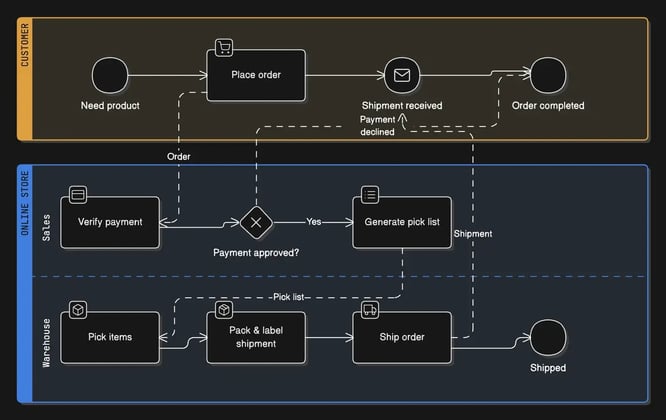
Image Source: Eraser
Modern HR automation tools work through intelligent systems that eliminate repetitive tasks. These tools create simplified processes throughout the employee lifecycle. Sophisticated technology powers these platforms and turns manual processes into efficient digital operations.
Trigger-based workflows for onboarding and offboarding
Trigger-based automation works on predefined conditions that start specific actions automatically. The system kicks off a sequence of tasks as soon as someone adds a new hire to the HRMS. These workflows then:
- Create profiles in the company's IAM application
- Add the hire as a requestor in the ITSM application
- Provision company email accounts
- Send welcome notifications via communication channels
- Generate documentation
The offboarding automation starts clearance processes, access revocations, and exit interviews automatically. This well-laid-out approach makes sure nothing gets overlooked during critical transitions and minimizes security risks.
AI-powered document processing and data entry
Advanced document processing capabilities are the foundations of HR automation. These systems utilize optical character recognition (OCR) and natural language processing (NLP) to extract relevant information from documents of all types. The process follows a logical sequence:
The system starts by collecting documents from multiple sources. OCR technology then converts printed text into machine-readable format. The AI classifies the document type, extracts key data fields, and verifies information against business rules. The processed data moves to appropriate systems or personnel.
This technology removes the need for manual data entry. It reduces human error and speeds up processing. To cite an instance, see how AI can automatically extract candidate details like name, contact information, education, and skills from resumes.
Automated compliance tracking and reporting
Compliance automation keeps track of over 3,000 federal and state legislation changes live. These systems build compliance rules right into HR processes and create an institutionalized framework, unlike manual approaches.
The technology spots regulatory updates that matter to your business and offers customized recommendations based on your company profile. The system creates live alerts, timely guidance, and recommended action items when it detects changes.
Advanced compliance engines track document expirations, certification renewals, and policy updates automatically. They keep detailed audit trails of all approvals and transactions that are a great way to get documentation during inspections or litigation. Automated compliance monitoring [link_3] builds a structured, traceable framework that reduces dependency on individual judgment while maintaining regulatory adherence.
Real-World Results from HR Automation
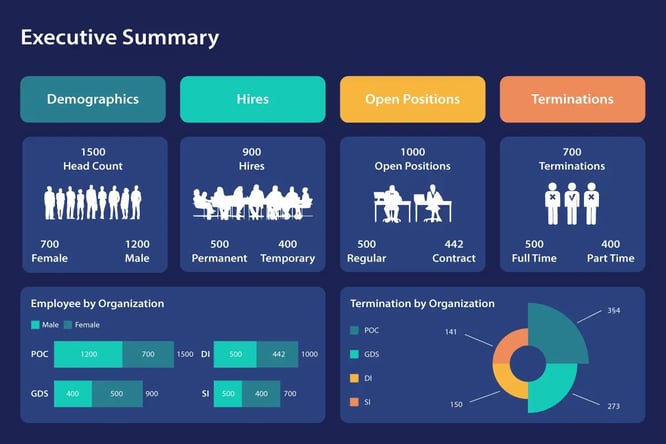
Image Source: Explo
Looking at concrete results from HR automation shows significant productivity improvements in organizations of all sizes. Here are examples that show how automation changes HR operations from time-consuming tasks into strategic advantages.
Case study: Jamf's automated onboarding success
Razorpay's use of Jamf made their employee onboarding experience much better. The team needed days to prepare Mac devices for 20 new employees before automation. Equipment wasn't ready on time and manual errors led to missed software installations. The enrollment process became simple and took just 10-15 minutes after automation. This zero-touch deployment proved valuable during the pandemic. New hires could now:
- Turn on their laptop
- Connect to Wi-Fi
- Enter organization-provided credentials
Squirrel financial services cut their onboarding setup time from over four hours per employee to zero-touch setup. Their HR team used to keep multiple laptops ready for their growing workforce, but now automation handles device preparation automatically.
Case study: Palo Alto Networks' AI assistant
Palo Alto Networks created an AI-powered HR assistant named Sheldon that changed employee support. The Copilot processes natural language requests about software access, account lockouts, and policy questions in seconds. The system handles issues from direct messages, Slack channels, email, and service portals.
The results speak for themselves - Palo Alto Networks saved 351,000 hours through this implementation. The system supports their FLEXWORK initiative and gives customized support based on each employee's location, role, and work habits.
Time savings from automated query handling
Companies in various industries report impressive time savings with HR automation:
A Pune-based IT company reduced payroll preparation from 10 days to just 2 days. A Hyderabad pharmaceutical company's payroll-related queries dropped from 45 to 12 per month. One organization used AI-powered HR automation to cut manual processing time by 80%. Their average response time went from 3 days to 20 minutes.
These examples show how automated systems help HR professionals move away from administrative tasks to focus on strategic initiatives and employee engagement.
Getting Started with HR Process Automation
A successful hr process automation implementation needs a systematic approach to build eco-friendly foundations. Most HR departments struggle with inefficiency. Manual processes consume up to 65% of HR teams' workdays.
Mapping current workflows and identifying bottlenecks
The first step requires a complete process audit to see how existing HR workflows function. You need to document each step in current processes—from onboarding to payroll. This helps identify repetitive tasks, approval delays, and error-prone areas. The mapping process reveals opportunities where automation can make the biggest difference.
Watch for common signs of bottlenecks. These include longer wait times, growing backlogs, and uneven workload distribution between teams. These pain points show where automation will give you the best return.
Choosing the right HR automation tools
Once you've identified workflows to automate, you should select hr automation tools based on four critical factors. The software needs smart automation capabilities that go beyond simple task scheduling to create complete workflows. It must integrate with your existing tech stack to prevent data silos. The interface should be user-friendly for both administrators and employees. The system must have robust compliance and security features since it handles sensitive employee data.
Training HR teams for adoption and change management
The best hr process automation system won't succeed without proper change management. Your team needs structured training plans that cover automation basics, payroll processing, and compliance reporting. Teams should participate in hands-on workshops with demo software that mirrors their daily tasks. The most successful programs create growth opportunities for non-technical staff who become automation champions in their departments. This strategy turns potential resistance into active participation.
Conclusion
HR process automation is a game-changer for modern organizations that don't deal very well with administrative burdens. Companies waste almost a full workday weekly on repetitive tasks that automation could handle. Organizations implementing automation tools report a 70% reduction in manual tasks, which makes a compelling case for change.
Eight automation opportunities exist from recruitment to offboarding. These opportunities show how technology creates space for strategic work. HR teams can focus on building employee participation and accelerating organizational growth once they reclaim hours previously lost to data entry and administrative processing.
Case studies from Jamf and Palo Alto Networks highlight automation's tangible benefits. Their transformation from four-hour onboarding processes to zero-touch deployment has substantially improved efficiency and employee experience. AI assistants saving hundreds of thousands of productivity hours demonstrate these technologies' remarkable potential.
Teams starting their automation trip should begin with careful workflow mapping to identify meaningful opportunities. Selecting tools with smart capabilities, strong integrations, and user-friendly interfaces will give successful implementation. Proper change management and team training remain vital for lasting change.
HR departments continue to evolve from administrative centers to strategic collaborations. Process automation grows more vital each day. Your organization can join forward-thinking companies that have accepted new ideas already. The next steps are clear - analyze current processes, identify bottlenecks, select the right tools, and prepare your team for a strategic future where technology handles routine tasks while human expertise addresses what matters most.
Key Takeaways
HR automation is revolutionizing workplace efficiency by eliminating time-consuming administrative tasks that currently consume up to 65% of HR teams' workdays. Here are the essential insights for transforming your HR operations:
• Automate 8 core processes - recruitment screening, onboarding, payroll, performance reviews, time-off tracking, self-service portals, compliance documentation, and offboarding workflows
• Achieve 70% reduction in manual tasks through smart automation tools that use AI-powered document processing, trigger-based workflows, and automated compliance tracking
• Start with workflow mapping - identify current bottlenecks and repetitive processes before selecting user-friendly tools with strong integration capabilities and comprehensive training programs
• Real results prove ROI - companies report reducing onboarding from 4+ hours to 10-15 minutes, saving 351,000 productivity hours annually, and cutting response times from 3 days to 20 minutes
The transformation from administrative burden to strategic focus isn't just possible—it's essential for competitive advantage. Organizations that embrace HR automation today position themselves to attract top talent, improve employee experience, and scale efficiently while their competitors remain trapped in manual inefficiencies.
FAQs
Q1. What are the key trends in HR automation for 2026? HR automation is shifting towards intelligent, end-to-end case resolution. AI-powered systems can understand natural language requests, integrate across multiple HR platforms, and securely execute tasks without human intervention, significantly reducing manual workload.
Q2. How much time can HR automation save? Organizations implementing HR automation tools have reported up to a 70% reduction in manual tasks. This can translate to saving entire workdays each week that were previously spent on administrative duties.
Q3. Which HR processes are most suitable for automation? The top processes for automation include recruitment and resume screening, employee onboarding, payroll administration, performance review management, time-off requests, employee data updates, compliance documentation, and exit interviews.
Q4. What benefits can companies expect from implementing HR automation? Companies can expect significant time savings, reduced errors, improved employee experience, and better compliance tracking. For example, some organizations have reduced onboarding time from hours to minutes and saved hundreds of thousands of productivity hours annually.
Q5. How should an organization start implementing HR automation? To begin, organizations should map their current workflows to identify bottlenecks and inefficiencies. Next, they should choose user-friendly automation tools that integrate well with existing systems. Finally, proper training and change management are crucial for successful adoption and implementation.
Trusted by 330+ CHROs
See why global HR teams rely on Amber to listen, act, and retain their best people.
